How to Track Ticket Sales and Registrations with Google Analytics
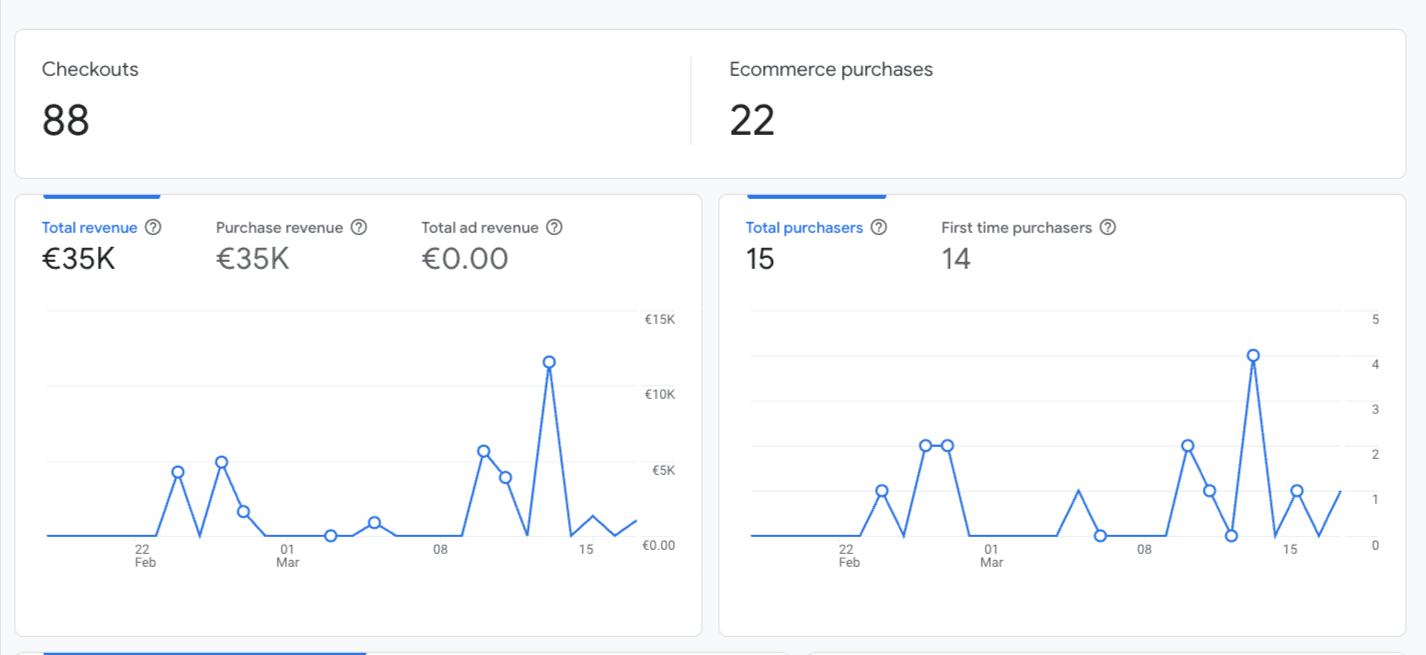
Event organization doesn’t end when you publish your agenda or launch ticket sales. The real work begins when your campaigns go live, and when you need to understand what actually drives people to buy.
Most event organizers invest in multiple channels - social media, newsletters, Google Ads, partnerships, and PR. But without proper analytics, it’s difficult to answer the key question: what actually sells tickets?
If you can’t connect your marketing activities to actual sales, it becomes almost impossible to optimize your budget and increase registrations.
Why Tracking Sales Is Critical for Event Success
Every event operates within a limited budget and timeframe. That’s why it’s essential to know which channels drive results—and which simply drain resources.
With proper tracking in place, you can answer questions like:
Which channel generates the most purchases?
Which campaign has the highest conversion rate?
How many users drop off before completing a purchase?
Where are you losing potential attendees?
These insights are not just “nice to have”—they are the foundation for decisions that directly impact your revenue.
The Problem with Most Ticketing Platforms
With many ticketing solutions, users are redirected to an external domain during checkout.
This may not seem like a big issue at first—but in practice, it leads to:
loss of valuable user data
incomplete or inaccurate conversion tracking
difficulty connecting campaigns to sales
no visibility into the full customer journey
The result? You see that sales are happening—but you don’t know why, or how to scale them.
The Advantage of Selling on Your Own Domain
When ticket sales happen on your own domain, analytics becomes a completely different game.
You’re no longer tracking just the final purchase; you’re tracking every step leading to it.
This allows you to understand not only what works, but also where and why users drop off.
What You Can Track (and Why It Matters)
With Google Analytics (GA4) and Google Tag Manager properly implemented, you gain full visibility into your eCommerce funnel—from the first click to the final purchase.
1. User Behavior and Engagement
You can understand how visitors interact with your website:
which pages get the most views
how long users stay on your event page
where users most often leave your site
the paths they take before purchasing
These insights clearly show where you’re losing user attention—and what needs improvement.
2. Traffic Sources and Campaign Performance
Tracking traffic sources gives you a complete picture of your marketing performance:
whether users come from Google, social media, or email campaigns
which channels drive actual purchases (not just clicks)
which campaigns deliver the highest ROI
This allows you to allocate your budget to channels that truly perform.
3. The Full eCommerce Funnel (Key to Growth)
This is where advanced tracking makes the biggest difference.
You can track every step of the purchase journey:
event page views (view_item)
adding tickets to cart (add_to_cart)
starting the checkout process (begin_checkout)
completed purchases (purchase)
Even more importantly, you can identify drop-offs:
how many users abandon their cart
at which step users exit the checkout process
This is where you uncover lost revenue—and opportunities for improvement.
4. Ticket and Pricing Performance
Analytics also helps you understand how your offer performs:
which ticket types sell best
how much revenue each category generates
your average order value (AOV)
With this data, you can optimize pricing, bundles, and ticket strategies.
5. Audience and Technical Insights
Beyond sales, you also gain valuable context about your users:
where your audience is coming from
whether they use mobile or desktop devices
how fast your pages load
These insights often reveal hidden issues—for example, a poorly optimized mobile checkout that hurts conversions.
How Konfica Enables Advanced Sales Tracking
Konfica is a ticketing solution that runs directly on your domain, enabling full integration with analytics tools.
This allows you to easily connect your system with:
Google Analytics (GA4)
Google Tag Manager
And get a complete picture of both sales and user behavior.
Instead of limited data, you gain full funnel visibility and a clear understanding of your marketing performance.
Data as the Foundation of a Successful Event
Today, event success doesn’t depend only on your agenda or speakers. It increasingly depends on how well you understand your audience and their decisions.
With clear data insights, you can:
make better marketing decisions
optimize your website and checkout experience
increase conversions without increasing your budget
In other words—you’re not just tracking sales.
You’re actively increasing them.
Frequently Asked Questions
How can I track ticket sales in Google Analytics?
You can track ticket sales using Google Analytics (GA4) with properly set up eCommerce tracking. This includes tracking events such as viewing the event page, adding tickets to cart, starting checkout, and completing a purchase.
The entire purchase process must happen on your own domain to ensure accurate and complete data.
What’s the difference between basic and advanced tracking?
Basic tracking shows how many people purchased tickets.
Advanced tracking gives you a full picture:
how many people viewed your event
how many clicked “buy”
how many dropped off during checkout
which channels your buyers come from
In other words, you don’t just see the result—you see the entire journey behind it.
Can I see which marketing channel drives the most sales?
Yes. With properly set up UTM parameters and Google Analytics, you can clearly see whether your buyers come from Google, LinkedIn, email campaigns, or ads.
This helps you identify high-performing channels and optimize your marketing budget.
What is an abandoned checkout and why does it matter?
An abandoned checkout refers to users who started the purchase process but didn’t complete it.
Tracking this helps you understand:
where users drop off
whether there are issues in the checkout process
if pricing or UX is preventing conversions
This is one of the most valuable insights for improving sales.
Can I track which ticket types perform best?
Yes. With eCommerce tracking, you can analyze:
sales by ticket type
revenue per category
popularity of different packages
This allows you to optimize pricing and offers.
Do I need Google Tag Manager for this?
Google Tag Manager is not mandatory, but it is highly recommended.
It allows you to manage tracking more easily without constantly modifying your website code, especially useful for campaigns and ongoing optimization.
How does Konfica help with sales tracking?
Konfica enables ticket sales directly on your domain, allowing you to implement a complete analytics setup without limitations.
This gives you:
full visibility into the customer journey
accurate conversion tracking
clear insights into marketing performance

